Enhancements to Printing Group Folios
Stay includes the following details when the group folio is printed using the Print Customization settings (Group ➜ Folio & Routing Rules ➜ Folios section ➜ Print Customization):
-
Summary of the total due
-
Guest name
-
Reservation stay dates
These details are displayed only when users select the following print customization options for folios in a group:
-
Group by - Reservation
-
Details by - Per Stay
Feature Setting
The following existing feature setting must be enabled to use this feature.
-
Name: Reservation and Group Folio Customization.
When the mentioned Print Customization is set for a group and the group folios are printed, the following changes are made to the printed folios:
-
The Date column is removed.
-
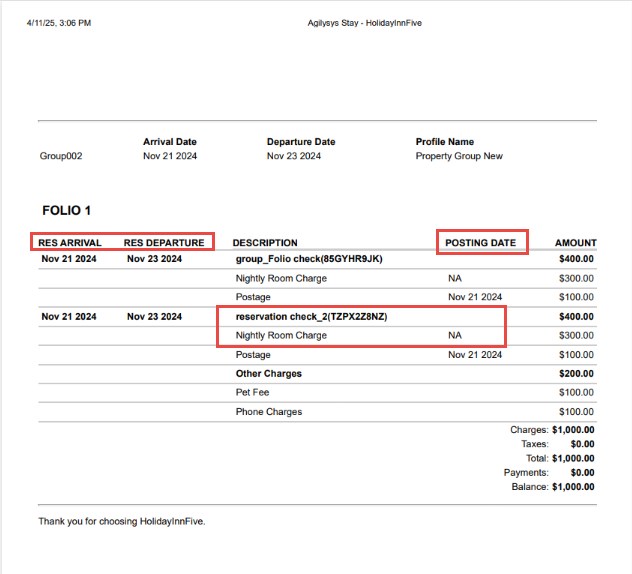
The following new columns will be displayed:
|
Column |
Description |
|---|---|
|
Res Arrival |
The arrival date of the reservations. |
|
Res Departure |
The departure dates of the reservations. |
-
The Description column displays the guest name associated with the reservation along with the confirmation ID as the header record and the various charges posted to the reservation as separate line items below the header.
-
This column is enhanced to group and display charges posted on various stay dates as a single line item.
-
Sample scenario
Consider the following charges posted to a reservation on various nights of stay.
|
Charge |
Date Posted |
Amount ($) |
|---|---|---|
|
Nightly Room Charge |
01-Mar-25 |
100 |
|
Resort Fee |
01-Mar-25 |
10 |
|
Nightly Room Charge |
02-Mar-25 |
100 |
|
Admin Fee |
02-Mar-25 |
20 |
|
Spa |
02-Mar-25 |
30 |
|
Nightly Room Charge |
03-Mar-25 |
100 |
|
Nightly Room Charge |
04-Mar-25 |
100 |
|
Nightly Room Charge |
05-Mar-25 |
100 |
In this scenario, Nightly Room Charge is posted on 5 different dates. Hence, the charges are grouped and displayed as a single record for a total amount of $500. Since the remaining charges are posted just once, they are displayed as separate line items for the amount posted.
-
A new column, Posting Date, has been added that displays the date when the charges are posted.
-
When a charge is posted for more than one stay date, it is grouped and displayed as a single line item with the date displayed as NA.
-
When a charge is posted just once, this column displays the date of posting.
-
-
The Amount column displays the sum of the charges posted to the reservation for the header record that contains the guest name and the confirmation ID of the reservation. For the grouped charges, the total amount of the charge posted is displayed. For non-grouped charges, the amount posted is displayed.